Short answer
No — Mautic has no way to attach a group of contacts to one deal with different roles, because Mautic has no deal object at all. Every native Mautic record — a segment, a campaign, a contact stage — is built around exactly one contact. A B2B sale is rarely one contact. Deal Flow’s Buying Committee Intelligence feature adds the missing layer: attach as many contacts as the real buying group has to one deal, and label each one by the role they actually play.
Why this is the differentiator, not a footnote: Kanban boards and deal stages exist in several places outside Mautic — a Trello board, a spreadsheet, an external CRM. None of those free workarounds attach role-labeled contacts to one deal record inside Mautic. This is the piece nothing else here covers.
What a buying committee is, in plain terms
“Buying committee” is the standard B2B sales term for the group of people, not the one person, who actually decides a purchase. A typical committee mixes several functions: someone who wants the product and pushes internally (the champion), someone who controls whether it fits the budget, someone who has to validate it technically, and sometimes someone who can simply say no. Selling to only the one contact you happen to have an email address for means missing the rest of that group — and B2B deals stall or die when one of those people was never engaged.
Where Mautic’s contact model breaks down
Mautic is built around the contact: segments group contacts, campaigns run against contacts, stages live on a contact. That is the right model for marketing automation, where the unit of work genuinely is one person’s inbox. It stops being the right model the moment a marketing-qualified lead becomes an active sale involving more than one person at the buyer’s company, because Mautic has no record that represents “this deal” as distinct from “this contact.”
Two workarounds are common, and both lose information:
- Pick one contact to represent the deal. You keep a single point of contact, but the budget holder, the technical evaluator and everyone else who actually has to sign off never show up anywhere in Mautic tied to that sale.
- Track each stakeholder as a separate contact record. Now every person is visible individually, but nothing connects them — there is no shared record that says these five people are the committee for this one deal, what stage it’s at, or what it’s worth.
Role labels Deal Flow uses
Deal Flow attaches contacts to a deal and labels each one with a role, so the committee is visible on the deal itself — not scattered across separate contact profiles.
Champion
Wants the product and pushes for it internally.
Decision Maker
Has final sign-off authority on the purchase.
Budget Holder
Controls whether the spend fits, separate from the decision itself.
Technical Evaluator
Validates the product actually does what it claims.
Influencer
Shapes the outcome without holding formal authority.
Custom roles
Add your own label for a role specific to how your deals actually get bought.
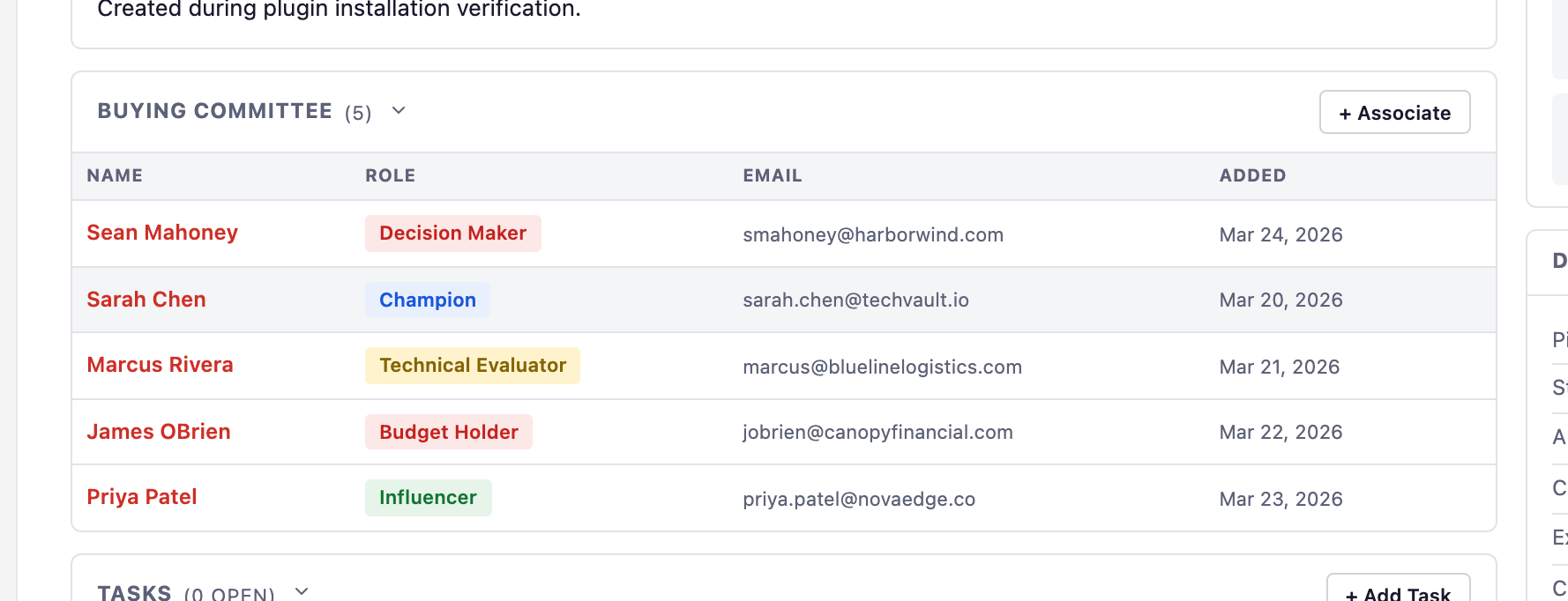
Single contact vs. buying committee, side by side
| Contact-only tracking | Deal Flow buying committee | |
|---|---|---|
| Contacts per deal | One | As many as the real committee has |
| Roles visible on the deal | No | Yes — champion, decision maker, budget holder, evaluator, influencer, custom |
| See who hasn’t been engaged yet | No — only the one tracked contact is visible | Yes — gaps in the committee show up on the deal |
| Ties stakeholders to one deal record | No — separate, unconnected contact records | Yes — one deal, one amount, one stage, every stakeholder attached |
How it works in practice
- Open a deal. Every deal in Deal Flow has its own contacts panel, separate from the single primary-contact field Mautic deals would otherwise default to.
- Attach each stakeholder. Pull in existing Mautic contacts — the champion, the budget holder, whoever else is part of this purchase — without duplicating their contact records.
- Label each one by role. Choose from the built-in roles or add a custom one, so the deal detail page shows the whole committee and who plays what part at a glance.
- Keep it in sync as the deal moves. As the deal advances through pipeline stages, the committee stays attached — nothing resets when a new stakeholder joins partway through.
Nothing about your existing contacts changes. Buying-committee roles live on the deal, alongside Mautic’s native contact records — they don’t replace segments, tags or contact stages you already use.
Frequently asked questions
Does Mautic support a buying committee or multiple contacts on one deal?
Not natively. Mautic has no deal object at all, so it has no concept of attaching several contacts to one sale with different roles. Every Mautic record — segments, campaigns, stages — is built around one contact at a time.
What roles can you label contacts with on a Deal Flow deal?
Champion, Decision Maker, Technical Evaluator, Budget Holder, and Influencer are built in, and you can add custom roles. Each contact attached to a deal gets one of these labels, and a deal can carry as many labeled contacts as the real buying group has.
Why does it matter if my CRM only tracks one contact per deal?
Because most B2B purchases are not made by one person. If your pipeline only has room for a single contact, you either pick one person to represent the whole group and lose the rest, or you split the deal across several contact records and lose the fact that it’s one sale.
Can I do this with Mautic segments or tags instead of a plugin?
Segments and tags can group contacts who share a trait, but they don’t tie a group of contacts to one specific deal record with its own amount, stage and close date — so you can see who’s associated with an account in general, not who’s on this particular deal and what role each one plays.
Track the whole committee, not one contact
Deal Flow is $99 one-time — unlimited users, one year of updates included.
Get Deal Flow — $99 Try free for 7 days