A kanban board turns stages into a working view
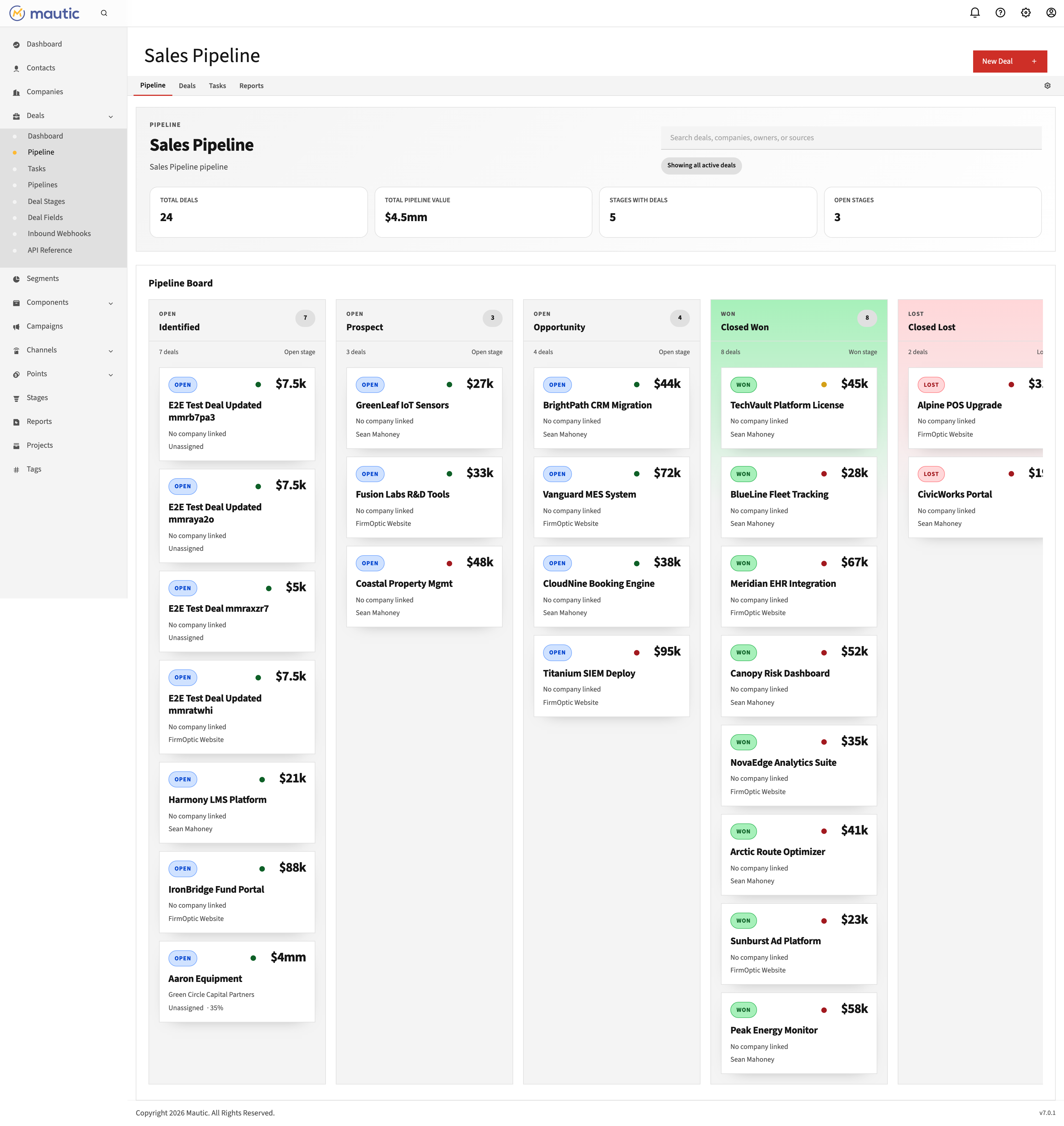
A Mautic kanban board shows each pipeline stage as a column and each deal as a card. Moving a card by drag and drop changes the deal's stage, so the board becomes the working view for pipeline progress. The result is a visual deal workflow inside the same Mautic instance used for contact and campaign operations.
Deal Flow is a Revenue Operations plugin that adds that board model to Mautic. Its ordered stages determine the left-to-right column layout, and its cards keep the current deal stage visible on the board. These behaviors are documented in the pipeline and deal references.
“we need something easy to use, plug and play, modern, efective, intuitive” Community phrasing from the Mautic Forums, accessed August 26, 2026. Spelling preserved from the source.
What a kanban view adds to Mautic
The board converts an ordered pipeline into a view that can be read from left to right. Each column is a configured stage; each card is a deal in that stage. The product documentation identifies the stage sort order as the column position and documents drag and drop as the way to move a deal between stages. Source: Deal Flow documentation, accessed August 26, 2026.
The order configured for pipeline stages sets their left-to-right position on the board.
Each deal appears under its current stage rather than as an isolated record.
Dragging a card to a destination column moves that deal into the represented stage.
Cards show the deal title and amount, owner avatar, health indicator, and buying committee count.
How Deal Flow's board works
- Define the pipeline. Create a named pipeline for the process you want to track.
- Order its stages. Each stage's sort order sets its position on the kanban board.
- Create or open a deal. A deal requires a title and pipeline; its selected stage determines the starting column.
- Move the card. Drag the card into another column to move the deal to that stage.
- Open the deal when more context is needed. The deal record holds the rest of the information attached to it.
The setup and field requirements above come from the current pipeline management and deal documentation, accessed August 26, 2026. For the full setup sequence, use How to Add a Pipeline to Mautic.
Keep the board readable. Start with the stages the team actually uses. The board reflects their configured order, so stage design comes before card movement.
Mautic board, spreadsheet, or external tool?
These are workflow choices, not quality rankings. The useful question is where the team intends to own deal-stage work.
| Approach | Working view | Choose it when |
|---|---|---|
| Kanban board in Mautic | Ordered stage columns with deal cards inside Mautic | The team wants pipeline-stage work in the Mautic instance it operates. |
| Spreadsheet | A general-purpose grid maintained in the sheet the team selects | The team intentionally wants a separate grid and owns the process there. |
| External tool | The views and records provided by that separate workspace | The team is standardized on that workspace and wants deal-stage work to remain there. |
The board behavior in the first row is documented by Deal Flow; the other rows describe the location of the workflow without making capability claims about another product. For a separately sourced comparison, see Deal Flow vs Aivie Trello.
Sources
- Deal Flow documentation: Pipeline Management, accessed August 26, 2026 — ordered stages and left-to-right board position.
- Deal Flow documentation: Deals and Kanban Board, accessed August 26, 2026 — required deal fields, card contents, and drag-and-drop stage movement.
- Mautic Forums: Sales Opportunity Pipeline, accessed August 26, 2026 — quoted community phrasing.
Frequently asked questions
Does Mautic have a kanban deal board?
A kanban deal board can be added to Mautic with Deal Flow. The plugin provides pipeline, stage, and deal views inside Mautic. Source: Deal Flow documentation, accessed August 26, 2026.
What happens when I drag a deal card to another column?
The deal moves to the stage represented by the destination column. The saved stage and the card's board position stay aligned. Source: Deal Flow documentation, accessed August 26, 2026.
What information appears on a Deal Flow card?
A card displays the deal title and amount, owner avatar, health indicator, and buying committee count. Source: Deal Flow documentation, accessed August 26, 2026.
Do I have to stop using spreadsheets or another tool?
No. A board inside Mautic is a workflow choice. Use it when the team wants stage work in Mautic; keep another workspace when the team intentionally owns the process there.
Put your deal stages on a board inside Mautic
Review the product details and installation path from the Deal Flow pricing section.
See Deal Flow Pricing Try free for 7 days